
This release adds the Bones engineering X-ray, mesh scanning in Pascal Capture, and the Block tool.
See what your house is actually made of

Draw a house, install Bones from the Plugins panel, and click X-Ray this level. The finishes come off and the construction underneath appears — every member derived from your model, and re-derived the moment you move a wall. Only a small per-level config node is saved with the project.
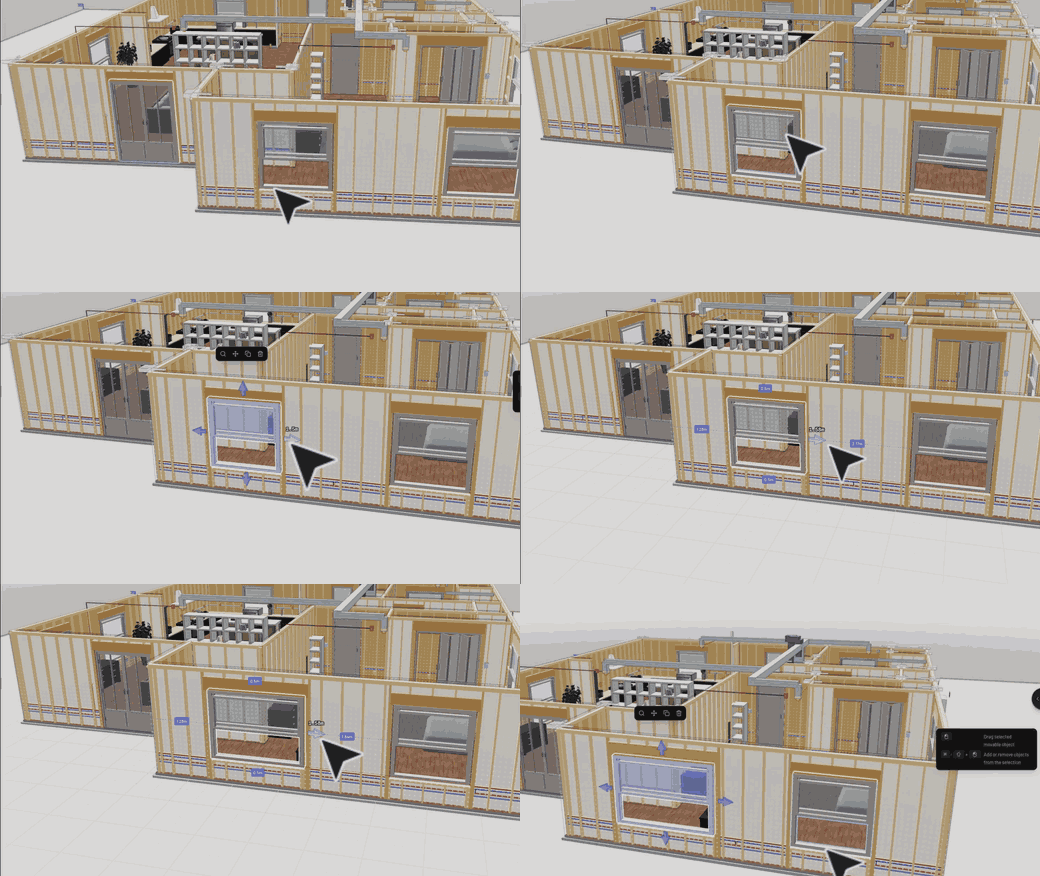
- Framing — studs at 16" or 24" on center, bottom/top/cap plates, and king studs, trimmers, span-sized headers, sills, and cripples around every opening.
- CMU walls — running-bond coursing, precast lintels, bond beams, with a per-wall framed / CMU / skip override.
- Floors — joists sized from span tables, rim joists, girders and posts when the tables run out, blocking.
- Roof — rafters, ridge, hips, ceiling joists, collar ties, and hurricane ties in high-wind states.
- Foundation — frost-depth footings, stemwalls, anchor bolts at code spacing, seismic hold-downs where the SDC calls for them.
- Electrical — NEC 210.52 receptacle walks that break at doorways, GFCI in wet rooms, switches at latch sides, lights, smoke alarms, the panel.
- Plumbing — a schematic DWV stack with drains and supplies to the wet walls.
- HVAC — equipment, trunk and branch ducts, registers, return, thermostat.
- Takeoff — every member the engines generated, counted rather than re-estimated: lumber by size and stock length, board feet, concrete yards, block counts, devices. Copy as CSV.
Sized to where you build
All 50 states, DC, and every Canadian province and territory are in the researched dataset, so your frost line sets footing depth, seismic states tighten the anchor bolts, hurricane ties appear on the coast, and Florida walls turn to block. Auto suggests a jurisdiction from your browser's timezone without a network call, and an International profile applies conservative defaults everywhere else.
You can also frame in light-gauge steel and select the rolling machine — FRAMECAD or Howick — so its own profiles populate the members.
Bones ships with the editor but stays off until you ask for it: open the Plugins panel and install it for your scene. It is by Julien Brissonneau and open source under MIT at pascalorg/plugin-bones.
Bones is a drafting aid, not engineering. Values are typical and approximate — always verify with your local building department.
Pascal Capture now builds a mesh

Pascal Capture 1.2 is on the App Store. Sweep the room and a connected surface builds in front of you, colored from the camera. While you are still scanning, the view switches between three modes:
- 3D — the room model: walls, doors, windows, furniture.
- Points — the raw LiDAR point cloud.
- Mesh — new. A connected surface, colored from the camera.
Show scan coverage fills surfaces with color as the evidence builds and leaves faint edges where the phone has not seen enough, so you know which corner to walk back to. The miniature expands to the middle of the screen for a one-finger orbit and a two-finger pinch, and the square-foot estimate updates live.
All of it comes back with the scan. In the editor a capture arrives with its layers in the scene tree — 3D, Point cloud, Mesh, and Device — each independently toggleable, with the device path replaying the walk. Hidden layers unmount rather than turning transparent, so they stop raycasting and stop doing work. The point cloud stays off until you ask for it, since it is the expensive one.
The format is open. @pascal-app/capture-protocol and @pascal-app/capture-viewer live in the editor repository: transport-neutral session contracts, a normalized session descriptor, packet headers for incremental data, and reference layers for point clouds, surface meshes, room models, and device motion. No backend, authentication, or particular transport is assumed — HTTP, WebSocket, WebRTC, local files, and in-memory producers all satisfy the same CaptureSource interface.
Model the rest with blocks

Block is a new tile in the Build panel, after Column. Place one and press Tab to edit its geometry directly in the canvas — persistent vertices, edges, and faces, not a box with sliders.
If you have used Blender, the shortcuts are already in your fingers:
123— vertex, edge, and face modeGRS— move, rotate, and scale the selectionE— extrude selected facesI— inset selected facesCmd/Ctrl+B— bevel selected edgesD— dissolve selected edgesM— merge selected verticesTab— exit mesh editing
The shortcuts for the mode you are in stay on screen. Loop cuts slide along the edge you point at, and each operation is one undo step.
Faces carry their own material slots, so a single block can be several materials at once. Items place on block faces the way they place on any other surface, and blocks read correctly in the 2D floorplan.
Also in this release
Print-ready model exports
Export 3D print files turns a building into slicer-ready parts. The export compiles a manifold architectural shell at a fixed 1:100 scale and emits one stackable part per level, packaged as millimetre-declared 3MF. Hidden nodes stay out of it — Visible nodes only is the default across GLB, STL, and OBJ too — and preflight blocks the export with a short, actionable message rather than handing you a broken mesh. Verified against CHITUBOX Basic 1.3.0 and PrusaSlicer 2.9.6.
Synchronized 2D, 3D, and split views
The editor and the community viewer now share one stage with 2D, 3D, and Split modes that stay in sync. Selection and camera follow you between them, so you can draw in plan and check the result in 3D without losing your place.
Edit many nodes at once
Select several nodes of the same kind and the inspector shows one set of controls for the parameters they share. Fields with differing values read as mixed until you set them, walls and ceilings expose the follows-level versus custom height choice, and the whole edit lands as a single undo step.
Roofs
Gutters now plan their own drainage: add a gutter and downspouts are generated along its run at code-derived spacing, instead of being positioned one by one. Roof materials, drawing, and intersection handling all improved, and items such as solar panels now place flush on sloped roof surfaces by following the surface normal.
Boots, an experiment
Boots turns the editor into a first-person game set in the building you are editing: walk it at eye height, break walls voxel by voxel, build with pieces you can keep as real walls, windows, doors, and roofs. Esc returns you to the editor exactly as you left it — the game never writes to the scene, and the only write path is the explicit Keep action. It is an alpha and ships uninstalled; install it per scene from the Plugins panel. Not OSHA compliant.
Fixes and performance
Project previews now come from the baked model, so lists and cards load faster. A level's walls are sewn into a single mesh for the viewer, and the frame cap is configurable. Hidden walls became pointer-transparent, and hover and selection now resolve nearest-first, so a hidden wall wins over the furniture behind it. A manual save no longer wedges autosave, and autosave no longer overwrites a scene during the load window. Room envelopes go to 20 m instead of 6 m, and the arbitrary maximums are gone from the inspector's dimension fields. Plugins can contribute their own per-kind sections to the floating inspector. Your display name is editable in one place and resolves consistently everywhere.
The editor packages behind these features moved to 1.0.0-beta.5, with the Pascal CLI at 1.0.0-beta.1. The architecture and the packages themselves are in the open-source editor repository.
This release was built by @Snoopy147 — Bones and the structural engines; @sudhir9297 — the block editor and the roof work; @wass08 — multi-selection editing, wall picking, and the core and viewer passes; and @Aymericr — the capture protocol, print exports, and the synchronized views. With viewer performance and fixes from @toycenterboss-bot, @ztffn, and @JimmyZheng-ZJU.