> ## Documentation Index
> Fetch the complete documentation index at: https://editor.pascal.app/docs/llms.txt
> Use this file to discover all available pages before exploring further.
# Pascal for Blender
> Install the Pascal Blender extension, send a scene from the editor straight into an open Blender, and understand what the importer rebuilds and how the loopback protocol works.
Pascal exports plain glTF with a small set of documented `extras`. The
[Pascal for Blender](https://github.com/pascalorg/blender-addon) extension reads them so a
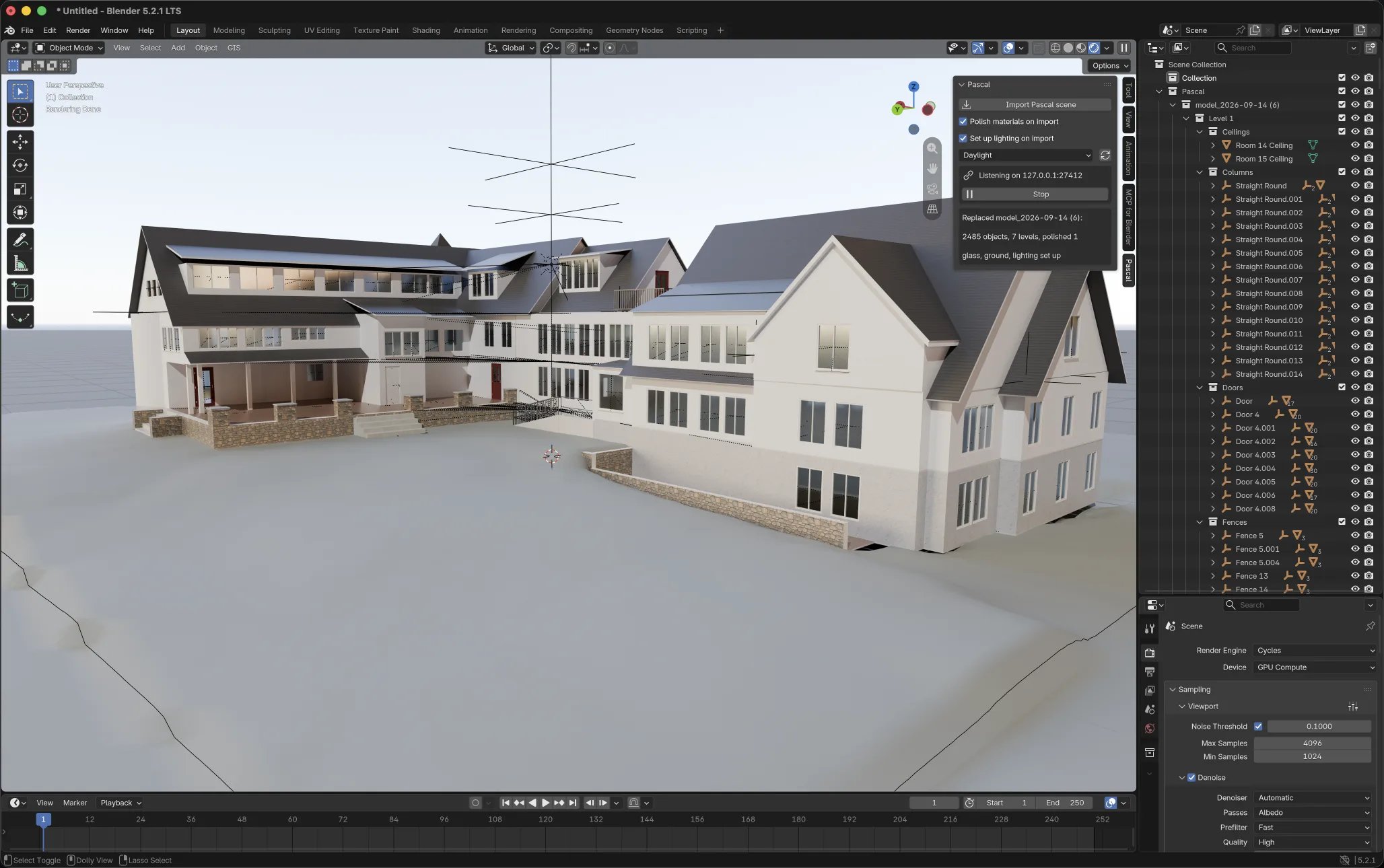
scene lands in Blender as something you can work with, not a flat pile of meshes:
* one collection per level with sub-collections per kind (walls, doors, windows, items, zones, slabs, ceilings, …)
* objects named after their Pascal labels, with `pascalId`, `kind` and `label` kept as custom properties
* zones rebuilt as coloured floor polygons (viewport only, excluded from renders)
* metric units, and re-importing the same project replaces the previous import
* optional material polish (real glass, leaf cutouts, a calmer site ground) and lighting presets
 The extension is open source under GPL-3.0, as Blender requires for add-ons. Blender 4.2 or
newer.
## Install
1. Download `pascal-.zip` from the
[releases page](https://github.com/pascalorg/blender-addon/releases).
2. In Blender: **Edit → Preferences → Get Extensions**, open the **▾** menu top right, choose
**Install from Disk…** and pick the zip.
3. Press `N` in the 3D viewport and open the **Pascal** tab. It should read
*Listening on 127.0.0.1:27412*.
## Send a scene from the editor
The extension is open source under GPL-3.0, as Blender requires for add-ons. Blender 4.2 or
newer.
## Install
1. Download `pascal-.zip` from the
[releases page](https://github.com/pascalorg/blender-addon/releases).
2. In Blender: **Edit → Preferences → Get Extensions**, open the **▾** menu top right, choose
**Install from Disk…** and pick the zip.
3. Press `N` in the 3D viewport and open the **Pascal** tab. It should read
*Listening on 127.0.0.1:27412*.
## Send a scene from the editor
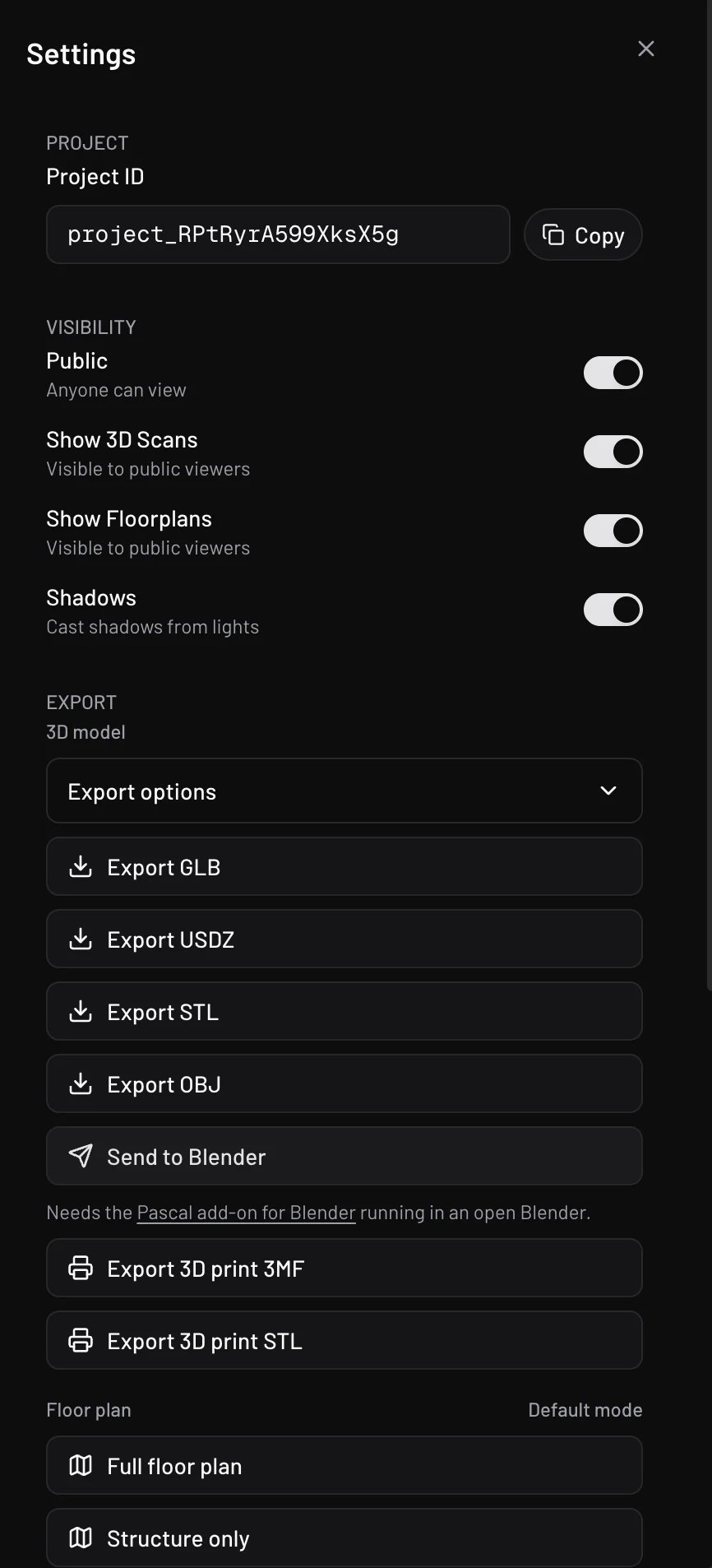 With Blender open and the extension enabled:
1. In the Pascal editor open **Settings → Export** and click **Send to Blender**.
2. The first time, Blender has not allowed your site yet. The Pascal tab in Blender lists the
origin (for example `https://editor.pascal.app`) with an **Allow** button. Click it.
3. Click **Send to Blender** again. The editor exports the live scene, hands it to Blender, and
reports Blender's own summary when the import is done.
The same "Include in file" choices as **Export GLB** apply. `https://editor.pascal.app` is
allowed by default; local or self-hosted editors go through the Allow step once.
No Blender open? The editor tells you so. Blender open but the button says your site is not
allowed? Look for the Allow button in Blender's Pascal tab.
## Import a downloaded file
**File → Import → Pascal scene (.glb)** works on any file from **Export GLB**, with the same
result as the send flow. Untick *Replace previous import* in the file dialog to keep an earlier
import of the same project.
## Lighting and material polish
Two options, both on by default, in the Pascal tab, the import dialog, and the extension
preferences (which govern scenes sent from the editor):
* **Polish materials** turns see-through surfaces into Principled glass, wires cutout alpha on
leaf textures, and gives the site ground a calmer albedo.
* **Set up lighting** adds a sky, a sun, a ground disc and a framed camera (`Numpad 0` looks
through it) and switches the viewport to rendered shading. Presets: *Daylight*, *Golden hour*,
*Overcast*, *Night* (adds a warm bulb per room and a porch light), *Physical sky*. The refresh
button next to the preset re-lights the current scene. Your render engine is left alone unless
you choose otherwise in the preferences.
Everything the extension adds is named (`Pascal sky`, `Pascal sun`, `Pascal camera`, …) and
reused on the next import, so tweak or delete freely.
## What the file contains
Every Pascal scene node is a glTF node named by its `pascalId` with these `extras`:
| Extra | Meaning |
| ------------------- | --------------------------------------------------------------------------------------------------- |
| `pascalId` | Stable id, also the node name |
| `kind` | `site`, `building`, `level`, `wall`, `door`, `window`, `item`, `zone`, `slab`, `ceiling`, `roof`, … |
| `label` | The user-facing name |
| `openable`, `clips` | Doors and windows that bake an open clip in the published web copy |
| `polygon`, `color` | Zones: `[x, z]` pairs (three.js Y-up) and a hex colour; the fill mesh is left out |
Anything else is ordinary glTF 2.0 that any importer handles. Glass exports with
`KHR_materials_transmission`, so Unity, Unreal and Blender all render it as glass.
## The loopback protocol
The extension listens on `127.0.0.1:27412` (the next few ports if taken). Anyone building
another receiver, or another sender, can speak the same four routes:
| Route | Purpose |
| ------------------------- | --------------------------------------------------------------------------------------------------------------------------------------------------------------------------------------------------- |
| `OPTIONS *` | CORS preflight, answers `Access-Control-Allow-Private-Network: true` for Chrome |
| `GET /pascal/health` | `{ app, version, addon, port, allowed }`, where `allowed` says whether the calling origin may send |
| `POST /pascal/import` | Body `model/gltf-binary`; optional `X-Pascal-Project-Name` (percent-encoded UTF-8), `X-Pascal-Project-Id`, `X-Pascal-Version`; answers `202 { id, state }`, `403 origin_not_allowed`, `400 not_glb` |
| `GET /pascal/import/` | `{ id, state: queued \| done \| failed, summary?, error? }` |
Browsers are gated by the origin allowlist; requests without an `Origin` header (curl, local
scripts) are accepted, since the allowlist exists to gate the browser's ambient authority. The
editor side lives in the open-source editor package (`lib/send-to-app.ts`), so the same button
could target any app that implements these routes.
With Blender open and the extension enabled:
1. In the Pascal editor open **Settings → Export** and click **Send to Blender**.
2. The first time, Blender has not allowed your site yet. The Pascal tab in Blender lists the
origin (for example `https://editor.pascal.app`) with an **Allow** button. Click it.
3. Click **Send to Blender** again. The editor exports the live scene, hands it to Blender, and
reports Blender's own summary when the import is done.
The same "Include in file" choices as **Export GLB** apply. `https://editor.pascal.app` is
allowed by default; local or self-hosted editors go through the Allow step once.
No Blender open? The editor tells you so. Blender open but the button says your site is not
allowed? Look for the Allow button in Blender's Pascal tab.
## Import a downloaded file
**File → Import → Pascal scene (.glb)** works on any file from **Export GLB**, with the same
result as the send flow. Untick *Replace previous import* in the file dialog to keep an earlier
import of the same project.
## Lighting and material polish
Two options, both on by default, in the Pascal tab, the import dialog, and the extension
preferences (which govern scenes sent from the editor):
* **Polish materials** turns see-through surfaces into Principled glass, wires cutout alpha on
leaf textures, and gives the site ground a calmer albedo.
* **Set up lighting** adds a sky, a sun, a ground disc and a framed camera (`Numpad 0` looks
through it) and switches the viewport to rendered shading. Presets: *Daylight*, *Golden hour*,
*Overcast*, *Night* (adds a warm bulb per room and a porch light), *Physical sky*. The refresh
button next to the preset re-lights the current scene. Your render engine is left alone unless
you choose otherwise in the preferences.
Everything the extension adds is named (`Pascal sky`, `Pascal sun`, `Pascal camera`, …) and
reused on the next import, so tweak or delete freely.
## What the file contains
Every Pascal scene node is a glTF node named by its `pascalId` with these `extras`:
| Extra | Meaning |
| ------------------- | --------------------------------------------------------------------------------------------------- |
| `pascalId` | Stable id, also the node name |
| `kind` | `site`, `building`, `level`, `wall`, `door`, `window`, `item`, `zone`, `slab`, `ceiling`, `roof`, … |
| `label` | The user-facing name |
| `openable`, `clips` | Doors and windows that bake an open clip in the published web copy |
| `polygon`, `color` | Zones: `[x, z]` pairs (three.js Y-up) and a hex colour; the fill mesh is left out |
Anything else is ordinary glTF 2.0 that any importer handles. Glass exports with
`KHR_materials_transmission`, so Unity, Unreal and Blender all render it as glass.
## The loopback protocol
The extension listens on `127.0.0.1:27412` (the next few ports if taken). Anyone building
another receiver, or another sender, can speak the same four routes:
| Route | Purpose |
| ------------------------- | --------------------------------------------------------------------------------------------------------------------------------------------------------------------------------------------------- |
| `OPTIONS *` | CORS preflight, answers `Access-Control-Allow-Private-Network: true` for Chrome |
| `GET /pascal/health` | `{ app, version, addon, port, allowed }`, where `allowed` says whether the calling origin may send |
| `POST /pascal/import` | Body `model/gltf-binary`; optional `X-Pascal-Project-Name` (percent-encoded UTF-8), `X-Pascal-Project-Id`, `X-Pascal-Version`; answers `202 { id, state }`, `403 origin_not_allowed`, `400 not_glb` |
| `GET /pascal/import/` | `{ id, state: queued \| done \| failed, summary?, error? }` |
Browsers are gated by the origin allowlist; requests without an `Origin` header (curl, local
scripts) are accepted, since the allowlist exists to gate the browser's ambient authority. The
editor side lives in the open-source editor package (`lib/send-to-app.ts`), so the same button
could target any app that implements these routes.