> ## Documentation Index
> Fetch the complete documentation index at: https://editor.pascal.app/docs/llms.txt
> Use this file to discover all available pages before exploring further.
# Doors and windows
> Place doors and windows that cut real openings into your walls, slide them along the wall, and size them exactly.
Doors and windows aren't decorations sitting on a wall — they cut real openings
through it. Delete one and the wall closes back up.
## Place a door or window
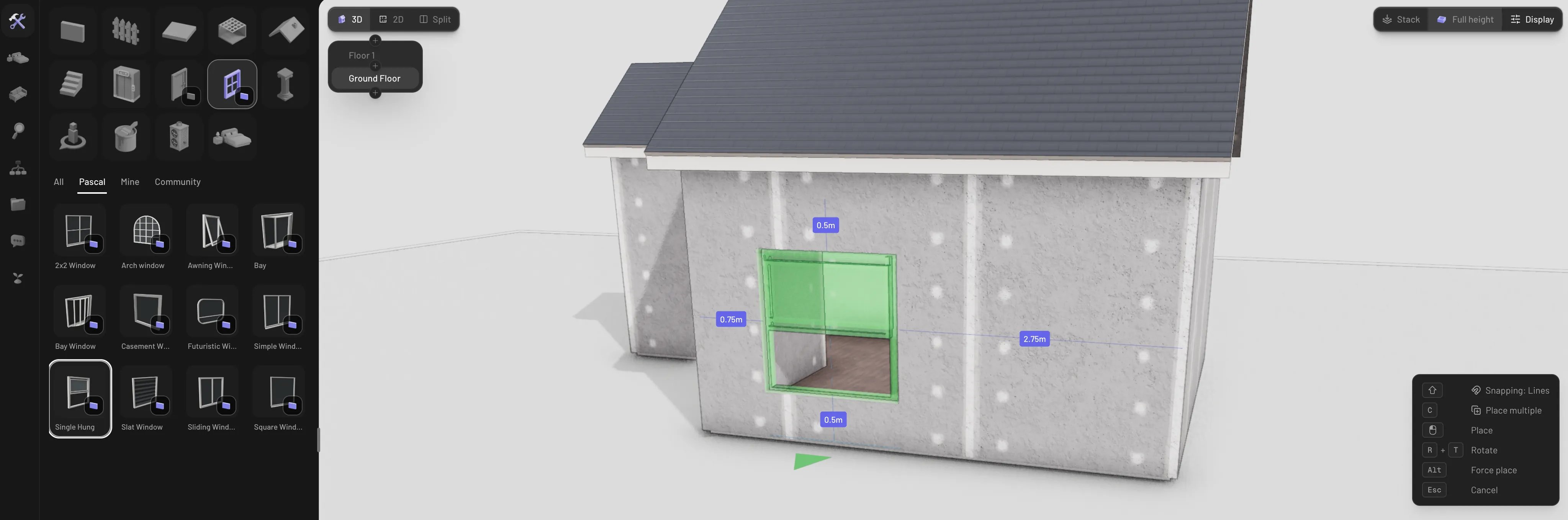
Pick **Door** or **Window** in the Build tab. A ghost preview follows your cursor;
the moment you hover a wall it snaps onto it, showing green when the spot is valid
and red when it isn't (off the wall, or overlapping another opening). Click to
place.
While placing:
* `R` flips which way the opening faces.
* `Alt` + click force-places over a collision warning.
* `Esc` cancels.
* The continuation chip in the helper panel (`C` to cycle) switches between
**Place once** and **Place multiple**, so you can drop a row of windows without
re-picking the tool.
 Openings can't hang off the end of a wall — they clamp to its bounds — and curved
walls can't host them. Gable and roof walls can: see
[roofs](/building/roofs#roof-walls-and-openings).
## Types and variants
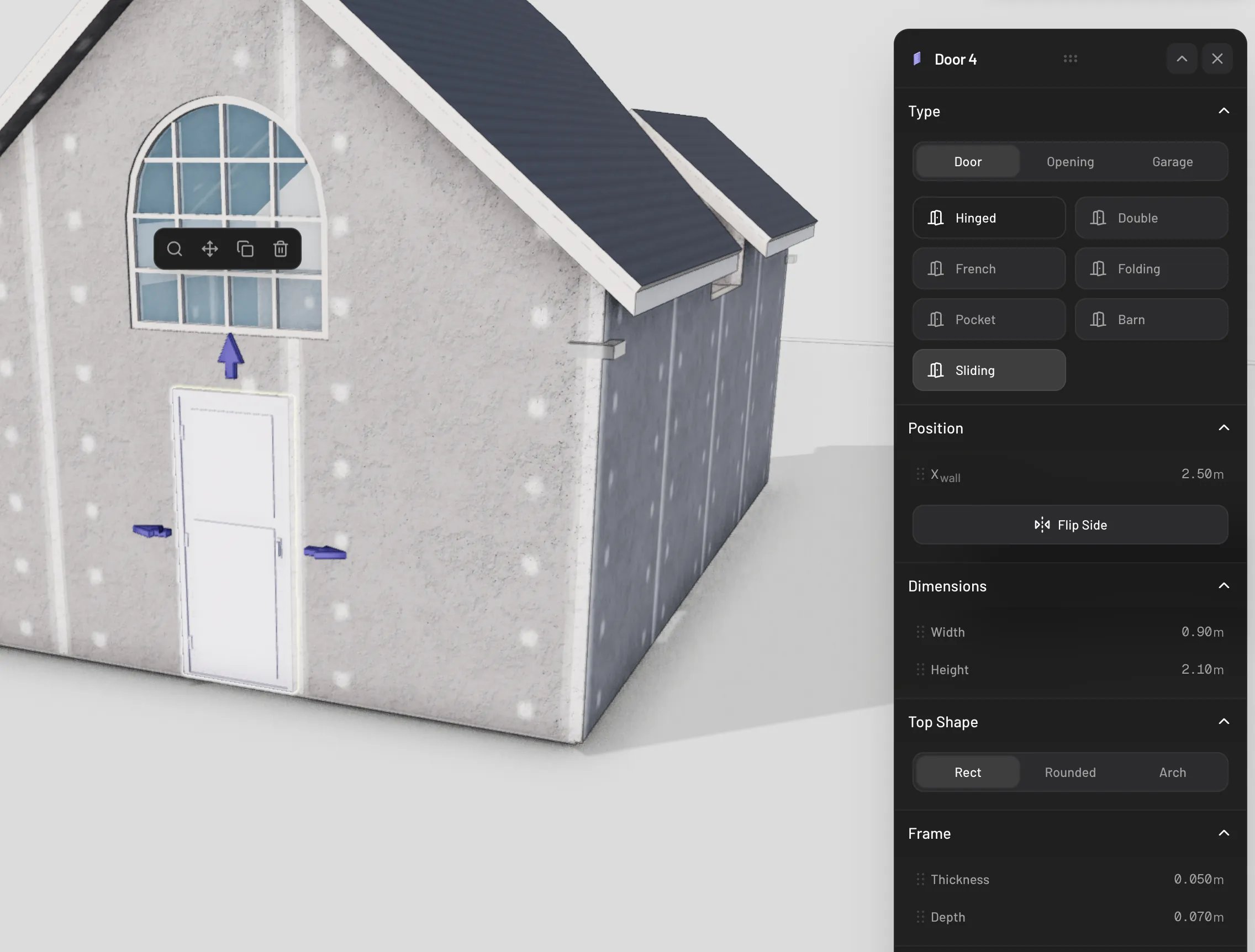
Every variant is a setting on the placed opening, so you can change it any time
from the properties panel:
* **Doors** have three modes — **Door**, **Opening** (a frameless cutout with no
leaf), and **Garage**. Door types: **Hinged**, **Double**, **French**,
**Folding**, **Pocket**, **Barn**, and **Sliding**. Garage types:
**Sectional**, **Roll-up**, and **Tilt-up**.
* **Windows** offer **Fixed**, **Sliding**, **Casement**, **Awning**,
**Single Hung**, **Double Hung**, **Bay**, **Bow**, and **Louvered**, plus the
same frameless **Opening** mode.
Openings can't hang off the end of a wall — they clamp to its bounds — and curved
walls can't host them. Gable and roof walls can: see
[roofs](/building/roofs#roof-walls-and-openings).
## Types and variants
Every variant is a setting on the placed opening, so you can change it any time
from the properties panel:
* **Doors** have three modes — **Door**, **Opening** (a frameless cutout with no
leaf), and **Garage**. Door types: **Hinged**, **Double**, **French**,
**Folding**, **Pocket**, **Barn**, and **Sliding**. Garage types:
**Sectional**, **Roll-up**, and **Tilt-up**.
* **Windows** offer **Fixed**, **Sliding**, **Casement**, **Awning**,
**Single Hung**, **Double Hung**, **Bay**, **Bow**, and **Louvered**, plus the
same frameless **Opening** mode.
 ## Move an opening
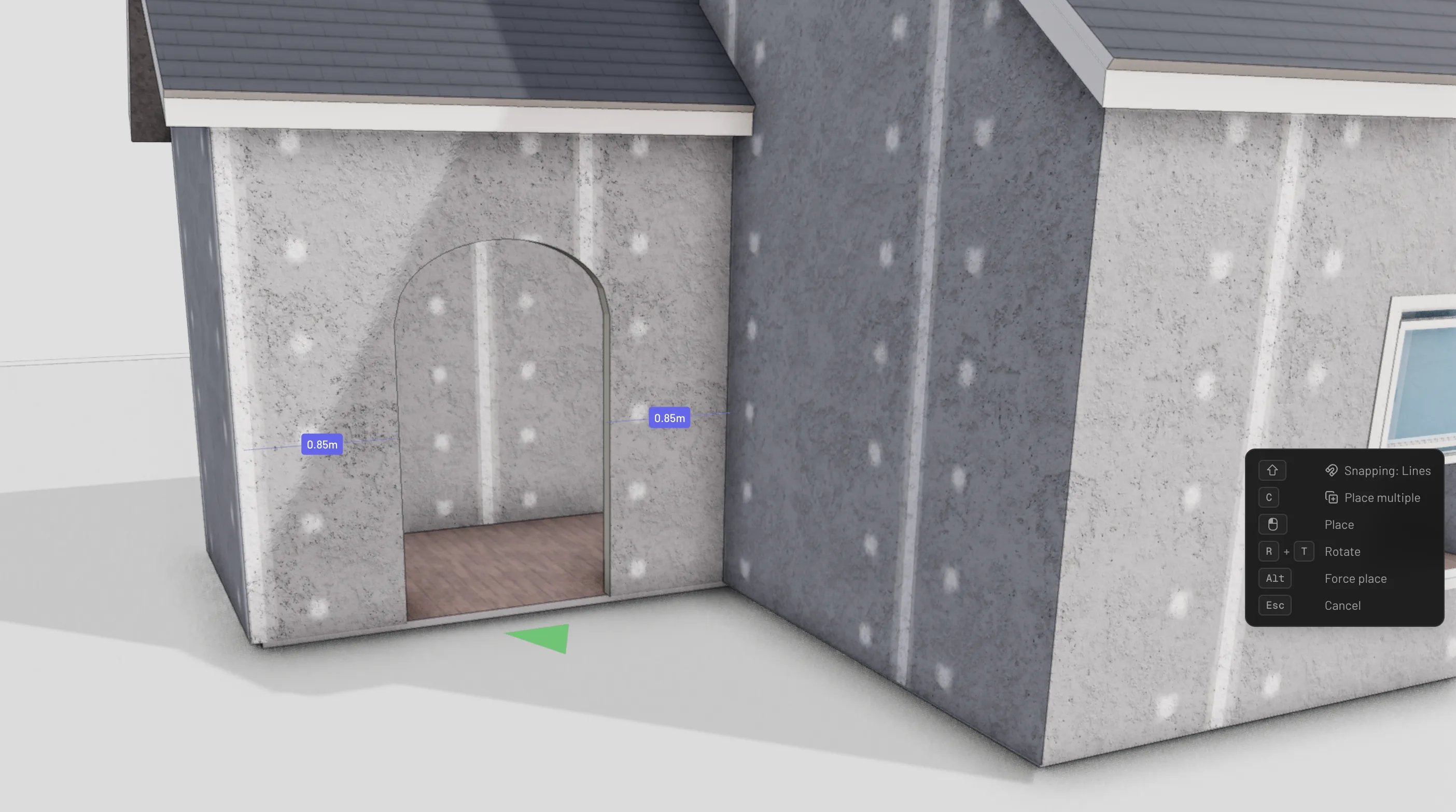
Grab the move handle on a selected opening (or use the **Move** action in its
panel) and drag. The opening slides along its wall, staying inside the wall's
bounds — and if you drag onto a different wall, it hops across and re-hosts there.
Away from any wall the ghost turns red and won't drop.
With **Lines** snapping active, alignment guides catch on neighboring doors,
windows, and wall items so you can line up a facade precisely.
## Move an opening
Grab the move handle on a selected opening (or use the **Move** action in its
panel) and drag. The opening slides along its wall, staying inside the wall's
bounds — and if you drag onto a different wall, it hops across and re-hosts there.
Away from any wall the ghost turns red and won't drop.
With **Lines** snapping active, alignment guides catch on neighboring doors,
windows, and wall items so you can line up a facade precisely.
 ## Sizes
Doors default to 0.9 × 2.1 m and windows to 1.5 × 1.5 m (picking a different type
adjusts the default — a double door starts at 1.5 m wide, a garage door at
2.7 × 2.4 m). To resize:
* Drag the width and height arrows on the selected opening.
* Or set exact values with the **Width** and **Height** sliders in the panel's
Dimensions section.
Doors always sit on the floor. Windows also move vertically: drag the window up
or down the wall (or use the panel's position controls) to set its sill height —
new windows start 0.5 m above the floor.
## Swing and direction
* **Flip Side** in the panel (or `R` with the opening selected) turns the opening
to face the other side of the wall.
* Hinged doors have a **Swing** section: **Hinges Side** (Left / Right) and
**Direction** (Inward / Outward), plus a handle-side choice.
* Sliding, pocket, and barn doors choose their slide direction (Left / Right).
## Open and close
Doors and operable windows really open. Press `E` with one selected to toggle it,
or drive it gradually with the operation slider in the panel. In walkthrough mode,
click a door to open and close it as you explore. Frameless openings and fixed
windows don't operate.
## Delete an opening
Select the opening and press `Delete` or `Backspace`, or use the **Delete** action
in its panel. The hole it cut disappears with it — the wall heals instantly.
## Sizes
Doors default to 0.9 × 2.1 m and windows to 1.5 × 1.5 m (picking a different type
adjusts the default — a double door starts at 1.5 m wide, a garage door at
2.7 × 2.4 m). To resize:
* Drag the width and height arrows on the selected opening.
* Or set exact values with the **Width** and **Height** sliders in the panel's
Dimensions section.
Doors always sit on the floor. Windows also move vertically: drag the window up
or down the wall (or use the panel's position controls) to set its sill height —
new windows start 0.5 m above the floor.
## Swing and direction
* **Flip Side** in the panel (or `R` with the opening selected) turns the opening
to face the other side of the wall.
* Hinged doors have a **Swing** section: **Hinges Side** (Left / Right) and
**Direction** (Inward / Outward), plus a handle-side choice.
* Sliding, pocket, and barn doors choose their slide direction (Left / Right).
## Open and close
Doors and operable windows really open. Press `E` with one selected to toggle it,
or drive it gradually with the operation slider in the panel. In walkthrough mode,
click a door to open and close it as you explore. Frameless openings and fixed
windows don't operate.
## Delete an opening
Select the opening and press `Delete` or `Backspace`, or use the **Delete** action
in its panel. The hole it cut disappears with it — the wall heals instantly.